Can I record and replay CAN traffic using Leaf v3?
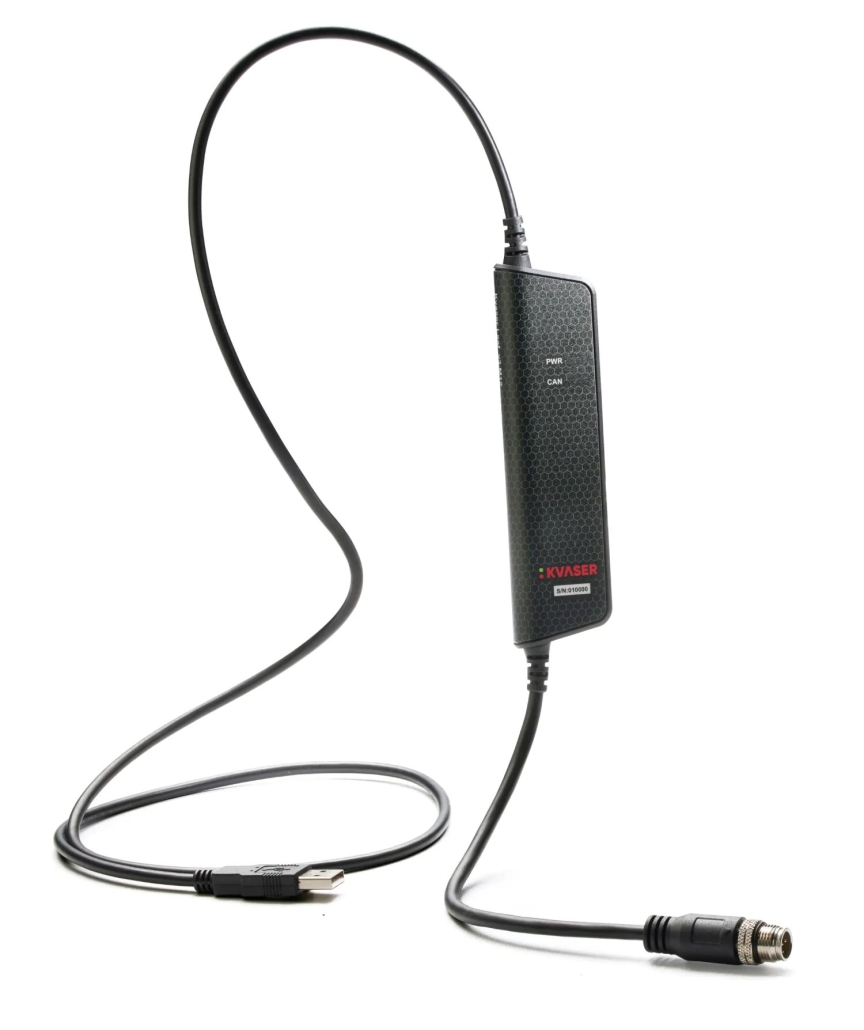
Yes, you can record and replay CAN traffic using the Kvaser Leaf v3 CAN interface. This versatile device provides comprehensive CAN traffic capture capabilities, allowing users to record CAN messages for later analysis or replay them for testing and simulation purposes. The Leaf v3 supports both standard CAN and CAN FD protocols, offering high-speed data transmission and reliable performance across various applications in automotive diagnostics, industrial automation, and embedded systems development. With proper software tools, users can easily configure the device to capture, store, and reproduce CAN bus communications with precise timing.
What is Kvaser Leaf v3 and how does it handle CAN traffic?
The Kvaser Leaf v3 is a professional-grade USB CAN interface that enables seamless communication between computers and CAN networks. This compact device serves as a bridge, allowing users to monitor, record, and transmit CAN messages with exceptional precision and reliability.
At its core, the Leaf v3 features advanced hardware capable of handling both standard CAN (2.0A/B) and high-speed CAN FD protocols. It connects to computers via USB and to CAN networks through a standard 9-pin D-SUB connector, making it compatible with most industrial and automotive CAN implementations.
The Leaf v3’s architecture includes dedicated hardware for timestamping messages with microsecond precision, which is crucial for accurate CAN bus replay. This precision allows for faithful reproduction of CAN traffic during testing and development phases. The device also features built-in galvanic isolation (up to 500V), protecting both the computer and the CAN network from potential electrical issues.
What distinguishes the Leaf v3 in the CAN technology ecosystem is its combination of high performance, reliability, and user-friendly operation. It can handle up to 20,000 messages per second, making it suitable for even the most demanding industrial data logging applications. For those interested in exploring the full range of CAN solutions, we recommend checking out Kvaser products.
How do you record CAN traffic using Kvaser Leaf v3?
Recording CAN traffic with the Kvaser Leaf v3 requires a straightforward setup process that combines hardware connection and software configuration. Once properly set up, the device can capture CAN messages with precise timestamps for later analysis or replay.
To begin recording CAN traffic:
- Install the Kvaser drivers on your computer (available for both Windows and Linux)
- Connect the Leaf v3 to your computer via USB
- Connect the Leaf v3 to your CAN network using the D-SUB connector
- Launch a compatible CAN monitoring software (such as Kvaser CanKing, PCAN-Explorer, or custom applications using the Kvaser CANlib SDK)
- Configure the software to match your CAN network parameters (bitrate, sampling point, etc.)
- Start the recording session with your desired filters and triggers
For optimal CAN traffic capture, configure the sampling rate according to your application needs—higher rates for detailed analysis, lower rates for extended recording periods. The Leaf v3 supports various triggering mechanisms, allowing you to capture specific events or message patterns rather than the entire traffic stream.
When recording high-volume CAN traffic, consider using buffer settings that prevent data loss during USB transmission peaks. For the most reliable results, close unnecessary applications on your computer to ensure consistent processing of incoming CAN messages.
Can Leaf v3 handle both CAN and CAN FD protocols?
Yes, the Kvaser Leaf v3 fully supports both traditional CAN (2.0A/B) and CAN FD (Flexible Data-rate) protocols, making it a versatile solution for modern automotive and industrial applications. This dual-protocol capability allows users to work with both legacy systems and next-generation CAN networks.
The CAN FD protocol support in Leaf v3 enables significantly higher data transmission rates compared to classic CAN. While standard CAN is limited to 1 Mbit/s and 8 data bytes per frame, CAN FD allows data rates up to 8 Mbit/s and up to 64 bytes per frame with the Leaf v3. This expanded capability is particularly valuable for applications like ECU programming, complex diagnostics, and data-intensive industrial systems.
When switching between protocols, the Leaf v3 automatically adapts to the appropriate mode without requiring hardware reconfiguration. This seamless transition makes it ideal for development environments where both protocol types might be needed. The device handles the increased bandwidth demands of CAN FD through optimised internal buffering and high-speed USB communication.
For practical implementation, users should note that while the Leaf v3 supports both protocols, the connected CAN network and other nodes must also support CAN FD for this functionality to be utilised. When working with mixed networks, the Leaf v3 can be configured to operate in classic CAN mode for compatibility with older systems.
What are the system requirements for replaying CAN traffic with Leaf v3?
Replaying CAN traffic with the Kvaser Leaf v3 requires specific system configurations to ensure accurate timing and reliable performance. The minimum requirements vary slightly depending on the complexity of the replay scenarios and the operating system being used.
For Windows systems, the basic requirements include:
- Windows 7 or newer (64-bit recommended)
- USB 2.0 port minimum (USB 3.0 recommended for high-load scenarios)
- Latest Kvaser drivers (minimum v5.36)
- 4GB RAM (8GB recommended for complex replay operations)
- Intel Core i3 or equivalent processor (i5 or better recommended)
For Linux systems, requirements include:
- Kernel version 3.4 or newer
- Latest Kvaser Linux drivers
- USB 2.0 port minimum
- 4GB RAM minimum
Beyond hardware specifications, CAN bus replay typically requires specialised software. Options include Kvaser’s own tools, third-party applications like Vector CANalyzer, or custom solutions built using the Kvaser CANlib SDK. The software must support replay functionality with precise timing control to accurately reproduce the original message sequences.
For timing-critical applications, we recommend using a system with minimal background processes and sufficient processing power to handle the replay operations without introducing timing jitter. To get insights into practical implementations, consider reviewing a relevant Case study that demonstrates successful CAN traffic replay in real-world scenarios.
How does Leaf v3 compare to previous Kvaser models for diagnostic applications?
The Kvaser Leaf v3 represents a significant advancement over previous Leaf models for diagnostic applications, offering enhanced performance, improved reliability, and expanded protocol support. These improvements make it particularly valuable for modern automotive diagnostics and industrial troubleshooting.
Compared to earlier models, the Leaf v3 introduces several key enhancements:
- Improved galvanic isolation (500V compared to 100V in older models), providing better protection against ground loops and electrical disturbances
- Support for CAN FD protocol, enabling access to the expanded diagnostic capabilities in modern vehicles
- Higher message throughput capacity (up to 20,000 messages per second)
- More precise internal timestamping for accurate timing analysis
- Enhanced error detection and reporting capabilities
- More robust USB connection with improved drivers
For automotive diagnostics, these improvements translate to more reliable communication with modern ECUs, ability to handle the higher data volumes in diagnostics sessions, and better protection against electrical issues when connecting to vehicle networks. The Leaf v3’s CAN FD support is particularly valuable for accessing the extended diagnostic services implemented in newer vehicle platforms.
In industrial applications, the improved isolation and higher performance make the Leaf v3 better suited for harsh environments and high-speed production systems. The enhanced error detection capabilities also facilitate more effective troubleshooting of intermittent CAN network issues that might be difficult to diagnose with less capable interfaces.
Key takeaways about recording and replaying CAN traffic with Leaf v3
The Kvaser Leaf v3 provides a powerful and flexible solution for recording and replaying CAN traffic across various applications. Its combination of protocol support, performance capabilities, and reliability makes it a valuable tool for development, testing, and diagnostic workflows.
Key benefits of using Leaf v3 for CAN traffic operations include:
- Dual-protocol support for both classic CAN and CAN FD, ensuring compatibility with both legacy and modern systems
- High-precision timestamping for accurate traffic analysis and faithful replay
- Robust galvanic isolation that protects both computer and CAN network
- Cross-platform compatibility with both Windows and Linux operating systems
- Extensive software support through Kvaser’s SDK and third-party applications
The device excels in applications like ECU testing, where recorded real-world CAN traffic can be replayed to simulate specific conditions, and in industrial data logging scenarios where long-term monitoring of CAN networks helps identify intermittent issues. For CANopen systems, the Leaf v3’s precise timing capabilities ensure accurate protocol analysis and verification.
When implementing a CAN recording and replay solution with Leaf v3, we recommend starting with small, focused recording sessions to learn the system capabilities before scaling to more complex scenarios. Properly configuring filters and triggers can significantly improve the quality and usefulness of recorded data while reducing storage requirements.
By leveraging the full capabilities of the Leaf v3, developers and technicians can create more robust systems, diagnose complex issues more efficiently, and validate implementations with greater confidence.