
How do I use Influx ReXgen with CAN bus?
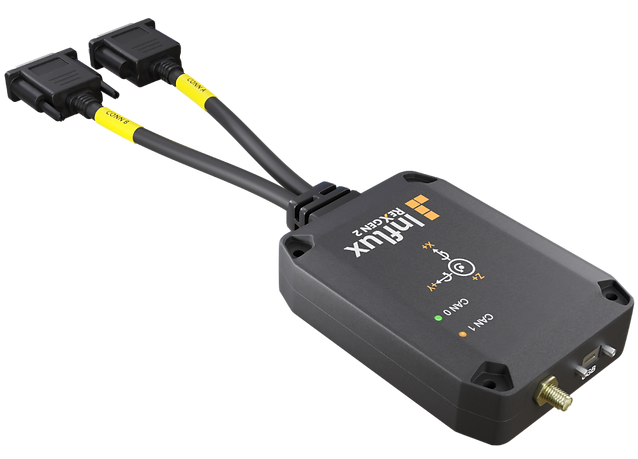
Using Influx ReXgen with CAN bus provides a comprehensive solution for data logging and diagnostics in vehicle and system testing environments. The ReXgen family of data loggers connects directly to CAN networks, allowing for real-time monitoring, recording, and analysis of CAN bus data. With features like trigger-based logging, support for various CAN formats including DBC, and integration with GPS/IMU systems, ReXgen offers powerful capabilities for professional diagnostics. The devices are designed for simple connection through standardized interfaces and can be configured for both basic and advanced diagnostic scenarios.
What is Influx ReXgen and how does it work with CAN bus?
Influx ReXgen is a professional-grade data logging system specifically designed for capturing, analyzing, and storing CAN bus communications in automotive and industrial applications. It works with CAN bus by interfacing directly with the network, capturing all messages transmitted between electronic control units (ECUs) and allowing for detailed analysis of vehicle systems.
The ReXgen product family includes various models with different capabilities, but all share the core functionality of connecting to CAN networks to monitor and record data. These devices feature multiple CAN channels that can simultaneously monitor different CAN networks, making them ideal for complex vehicle architectures.
At its core, ReXgen operates by passively listening to CAN communications, timestamping messages, and storing them based on user-defined parameters. The system can be configured to capture all CAN traffic or trigger recording based on specific events or message IDs, allowing for targeted diagnostics of particular vehicle subsystems.
ReXgen devices integrate with CAN bus systems through standard DB9 connectors using the CAN protocol, making them compatible with virtually any CAN-equipped vehicle or industrial system. This universal compatibility ensures that ReXgen can be deployed across diverse testing environments without specialized adaptors or configuration.
How do I connect ReXgen 2 to a CAN bus network?
Connecting a ReXgen 2 to a CAN bus network involves a straightforward process requiring minimal hardware. First, identify the CAN bus connection point in your vehicle or system, typically accessible through the OBD-II port in modern vehicles or dedicated CAN terminals in industrial systems.
For physical connection, you’ll need:
- A CAN interface cable compatible with ReXgen 2 (DB9 to OBD-II or custom connector)
- Power supply connection (USB or dedicated power input)
- Optional Kvaser hardware for expanded functionality
The connection process follows these steps:
- Power off the system you’re connecting to for safety
- Connect the CAN interface cable between the ReXgen 2 and the vehicle’s OBD-II port or CAN terminals
- Ensure proper pinout matching if using custom connectors (typically CAN High, CAN Low, and Ground)
- Power on the ReXgen 2 device using the appropriate power source
- Verify connection through the status LEDs on the ReXgen 2 (a solid green light typically indicates successful connection)
ReXgen 2 is designed for seamless integration with Kvaser hardware, allowing for expanded capabilities through additional interfaces. For connection validation, the ReXgen software will display active CAN traffic when properly connected, confirming that data is being received from the bus.
ReXgen2
What are the key features of ReXgen for CAN bus data logging?
ReXgen offers several powerful features specifically designed for effective CAN bus data logging in professional environments. The system provides flexible memory options, with both internal storage and SD card expansion capabilities allowing for extended recording sessions without data loss, even in high-bandwidth CAN environments.
The most significant capabilities include:
- Trigger-based logging – Configure the system to start recording based on specific CAN messages, signal values, or external inputs, ensuring you capture only relevant data
- DBC file support – Import industry-standard DBC files to decode raw CAN messages into meaningful engineering values in real-time
- Multi-channel recording – Simultaneously log data from multiple CAN buses with precise timestamping
- High-speed sampling – Capture CAN data at the full bus rate with no missed messages
- Advanced filtering – Record only specific message IDs or data matching custom criteria to optimize storage use
ReXgen’s real-time data processing capabilities transform raw CAN messages into human-readable formats during logging, making analysis significantly more efficient. This is particularly valuable in vehicle testing scenarios where immediate data interpretation can identify issues without post-processing delays.
The system also supports various CAN formats beyond standard CAN, including CAN FD (Flexible Data-rate) and J1939 protocols, ensuring compatibility with modern vehicle networks and specialized industrial implementations. This versatility makes ReXgen suitable for applications ranging from passenger vehicles to heavy equipment and specialized industrial systems.
How can I configure ReXgen for advanced CAN diagnostics?
Configuring ReXgen for advanced CAN diagnostics begins with establishing your testing parameters in the ReXgen software environment. The process involves creating a project that defines which CAN channels to monitor, what data to record, and under what conditions logging should occur.
For sophisticated diagnostics, follow these configuration steps:
- Import relevant DBC files to decode manufacturer-specific CAN messages
- Set up trigger conditions based on specific CAN IDs, signal values, or external events
- Configure sampling rates appropriate for your diagnostic needs
- Enable GPS/IMU support to correlate CAN data with physical location and vehicle movement
- Establish pre-trigger and post-trigger buffer sizes to capture data before and after events
GPS/IMU integration represents one of ReXgen’s most powerful diagnostic capabilities. By synchronizing vehicle position, orientation, and movement data with CAN messages, you can perform location-based diagnostics that identify how vehicle systems respond to specific driving conditions or geographical features.
Security considerations are equally important in professional diagnostics. ReXgen allows for encrypted data storage and secure access controls to protect proprietary vehicle data. When configuring for sensitive applications, enable data encryption, set up user authentication, and establish secure storage protocols for logged files to maintain data integrity and confidentiality throughout the diagnostic process.
What are the advantages of ReXgen compared to other CAN loggers?
ReXgen offers several distinct advantages over other CAN logging solutions available in the market. Its primary strength lies in its balance of professional-grade capabilities with user-friendly operation, making it accessible for both engineering teams and field technicians.
Key competitive advantages include:
- Superior memory management with intelligent compression algorithms that maximize recording time
- Exceptional trigger flexibility with complex conditional statements not available in simpler loggers
- Integrated environmental sensors providing context beyond just CAN data
- High-performance real-time analysis without requiring post-processing
- Scalable deployment options from single-vehicle testing to fleet-wide monitoring
For professional fleet applications, ReXgen provides unified data management across multiple vehicles, allowing for comparative analysis that identifies anomalies or performance variations between similar vehicles. This capability is particularly valuable for quality control in production environments or for monitoring fleet health over time.
From a cost-effectiveness perspective, ReXgen delivers enterprise-grade functionality at a price point that makes comprehensive testing economically viable across entire vehicle development programs. The system’s modular approach allows organizations to start with basic functionality and expand capabilities as testing requirements grow, avoiding the significant upfront investment required by many competing systems.
Interested in seeing real-world applications? Check out our Case study section for examples of how ReXgen has been implemented in various professional environments.
Key takeaways for optimizing your CAN bus diagnostics with ReXgen
To maximize the effectiveness of your CAN bus diagnostics with ReXgen, focus on strategic implementation of the system’s capabilities rather than simply recording all available data. Begin by clearly defining your diagnostic objectives and configuring the system to target specific subsystems or behaviors.
Best practices for optimizing ReXgen usage include:
- Create custom triggers tailored to your specific diagnostic scenarios
- Utilize DBC files for all vehicles under test to ensure meaningful data interpretation
- Implement strategic sampling rates – higher for critical systems, lower for background monitoring
- Regularly back up configuration profiles to maintain consistency across testing sessions
- Develop standardized analysis procedures for comparing results across different test runs
When troubleshooting common issues, remember that most connection problems stem from incorrect CAN termination or baud rate settings. If you’re not seeing data, verify both physical connections and that your ReXgen is configured for the correct CAN speed used by the target system. For intermittent issues, extended logging sessions with targeted triggers often reveal patterns that wouldn’t be apparent in shorter recordings.
For professional environments, consider implementing a structured data management system that organizes logs by vehicle, test type, and date to facilitate longitudinal analysis. This approach enables more sophisticated diagnostics that can identify developing issues before they cause failures, turning ReXgen from a reactive troubleshooting tool into a proactive maintenance system.